Introduction
LLMs are trained on public, static data. They know nothing about your private company information or recent events. When you ask about your specific data, they fail. They either hallucinate an incorrect answer or simply say they don’t know. This is exactly why RAG with Ollama becomes important when working with local data.
The Problem with Normal LLMs
This failure comes from three core limitations:
- The Knowledge Gap: The model cannot answer questions about your internal data because it was never trained on it, and it cannot answer anything that happened after its training cutoff.
- The Length Limit (context window): LLMs cannot read unlimited text. Long PDFs or multi-page reports exceed the model’s context length, and summarizing them often removes important details.
- The Privacy Rule: Sensitive documents cannot be uploaded to external cloud services. Your AI solution must run locally to keep your data private.
Why Local RAG Solves This Problem
When your model cannot answer questions about your private data, you technically have two options: fine-tuning or RAG. Both solve the knowledge gap, but in very different ways.
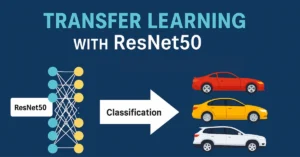
Fine-tuning means retraining the model with your own data so it can learn new information, but in practice it is slow and resource-heavy. It requires GPUs or paid cloud compute, careful data preparation, and must be repeated every time your data changes. We explained the basics in our InceptionV3 tutorial, and that example shows how fine-tuning can be a structured and effective process. However, when you simply want quick answers from a PDF you just received, a lighter and more flexible approach is often a better fit.
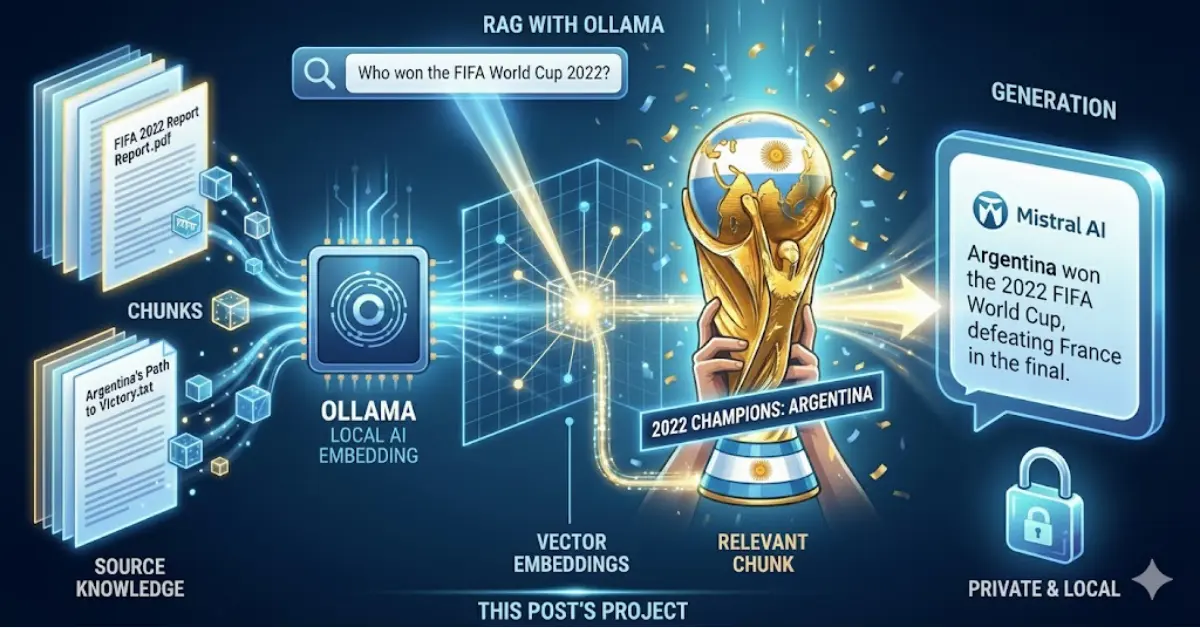
This brings us to the more practical option: Retrieval Augmented Generation (RAG). In this post, we will implement RAG with Ollama to solve these challenges locally.
If you are new to Ollama, you can check our earlier post on installation and basic usage: PandasAI and Ollama Local AI Data Analyst.
RAG does not retrain anything. Instead, it allows your local model to:
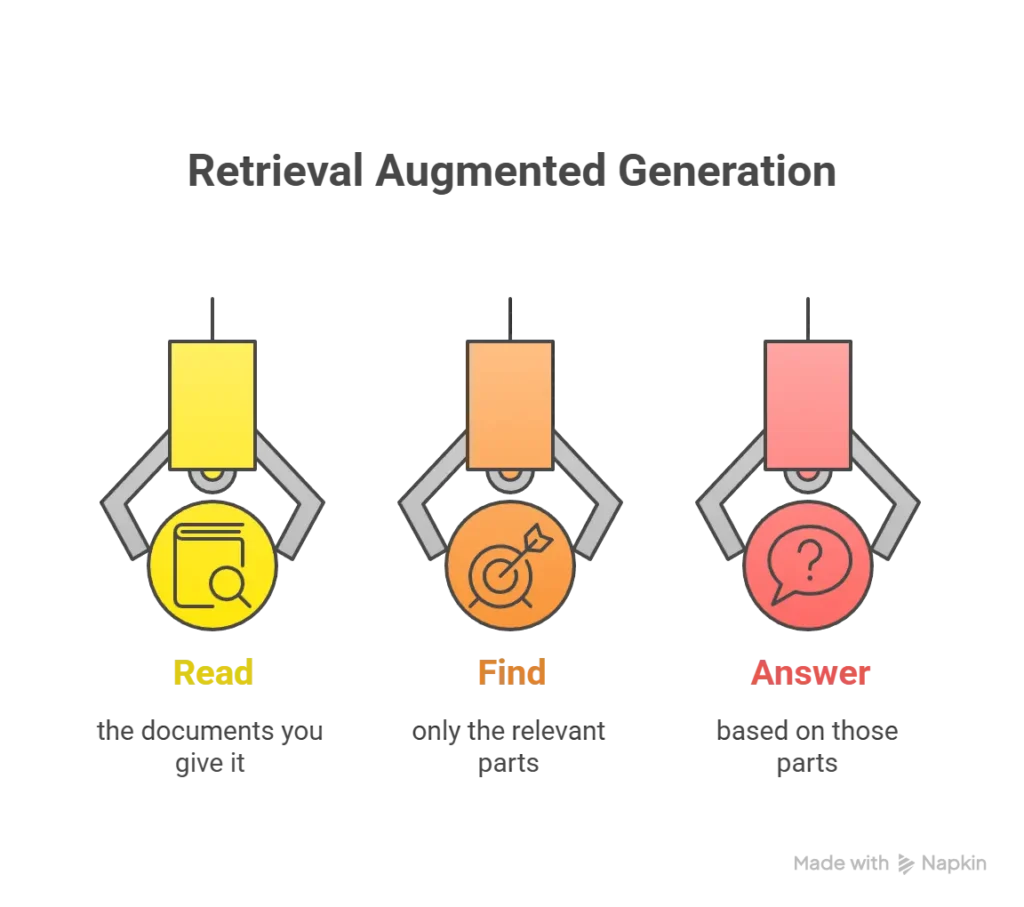
Everything stays inside your machine. No cloud. No retraining. No large GPU requirements.
RAG is the simplest and most efficient way to make a small local model like Mistral or Llama 3.1 answer questions from your private, updated, or large documents.
What You Will Build in This Tutorial
Here are the steps we will follow in this post to build a complete RAG with Ollama pipeline:
Step 1: Test Mistral Without RAG
Step 2: Fetch an External Data Source
Step 3: Split the Text into Chunks
Step 4: Generate Embeddings for Each Chunk
Step 5: Convert the User Question into an Embedding
Step 6: Find Relevant Chunks Using Cosine Similarity
Step 7: Build the RAG Context
Step 8: Ask Ollama Again Using RAG
Step 9: Compare the Results Before and After RAG
Understanding Context Length Before We Start
Before we start the steps for building RAG with Ollama system, you might wonder why we don’t just paste the entire text directly into the model. To answer that, here’s a quick note about context length.
When you chat with ChatGPT or any LLM, the model predicts the next word based on your prompt and its previous responses. As the conversation continues, the model keeps track of earlier messages, but only up to a certain limit. This limit is called the context window, and it’s measured in tokens.
To learn more about tokens and tokenization, you can check our post: https://dataskillblog.com/understanding-tokenization-in-ai
For example, the question “Who won the FIFA World Cup 2022?” is about 10 tokens, and the answer “Argentina won the 2022 World Cup.” is around 9 tokens. Together, the conversation uses 19 tokens. Every new message adds more tokens, and once you reach the limit, the model can no longer keep all previous information in memory.
Different models have different context limits. For example, the local model we use in this post, Mistral, supports around 32,768 tokens. If you paste a large document that exceeds or even approaches this limit, the model will drop older parts of the text, leading to incomplete or inaccurate answers.
To give you a sense of how context windows vary across models:
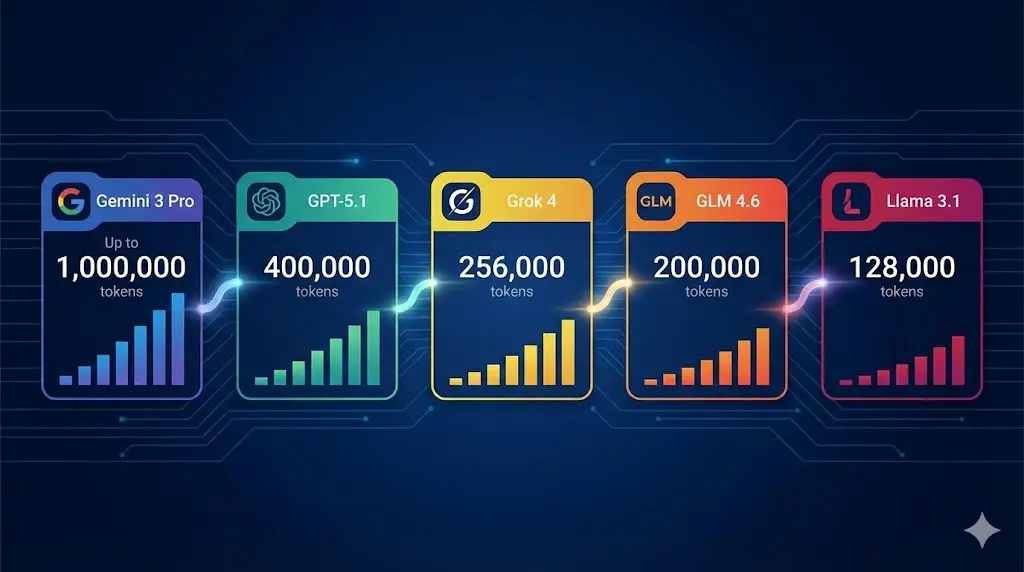
Even with these improvements, there are still practical limits. That’s why we can use RAG with Ollama, which lets us break the text into smaller chunks and Retrieve only what the model needs.
Step 1: Test Mistral Without RAG
Before we test the model, make sure Ollama is installed and the Mistral model is downloaded. If you haven’t installed Ollama yet, you can quickly do so from the official website. Download the Windows installer, run the setup, and Ollama will start automatically in the background. To confirm it’s ready, open PowerShell and run:
ollama --version
Then pull the Mistral model using:
ollama pull mistral
You can verify the model is installed with:
ollama show mistral
You should see something like:
Model
  architecture        llama
  parameters          7.2B
  context length      32768
  embedding length    4096
  quantization        Q4_K_M
Now that Mistral is running locally, let’s see how it behaves without RAG. We start by asking a question that is clearly outside its knowledge range:
“Who won the FIFA World Cup 2022?”
The Mistral 7B model available through Ollama was trained on data only up to around September 2021, so it has no information about events that happened afterward.
Here’s the code we used in the notebook:
import requests
import json

url = "http://localhost:11434/api/chat"

payload = {
    "model": "mistral",
    "messages": [
        {"role": "user", "content": "Who won the FIFA World Cup 2022?"}
    ],
    "stream": False
}

resp = requests.post(url, json=payload)
data = resp.json()

print(data["message"]["content"])
And here is the model’s actual response:
As of my last update, the FIFA World Cup 2022 has not taken place yet. The tournament is scheduled to be held in Qatar from November 21, 2022, to December 18, 2022. Therefore, at this moment, no team has won the World Cup for 2022. The last World Cup was won by France in 2018.
This confirms Mistral’s cutoff limitation, making RAG with Ollama the solution for up-to-date answers.
Step 2: Fetch an External Data Source
Since Mistral couldn’t answer the question using its built-in knowledge, we now need to provide the correct information from an external source. In a real RAG setup, this could be an internal PDF, policy document, or company report. For this tutorial, we’ll use something simple and reliable: the Wikipedia page for “2022 FIFA World Cup.”
Here is the code to fetch the page content using the wikipedia Python library:
#Make sure you have install the wikipedia library
import wikipedia

wikipedia.set_lang("en")

page = wikipedia.page("2022 FIFA World Cup", auto_suggest=False)
text = page.content

print(text[:100])
You should see something like:
The 2022 FIFA World Cup was the 22nd FIFA World Cup, the quadrennial world championship for national...
Using the OpenAI tokenizer tool, the full content of this Wikipedia page “”2022 FIFA World Cup”” is about 14,665 tokens. And this is just one document. If you add another similar source; another 15,000 tokens, you’re already near 30,000 tokens, which is almost the entire Mistral context limit of around 32,768 tokens.
A single large document might fit, but two back-to-back definitely won’t, and you still need extra space for your question and instructions. This is exactly why we need a RAG workflow: instead of giving the whole text to the model, we’ll break it into smaller chunks, embed them (don’t worry we will explain what embedding is in the coming steps), and retrieve only what matters.
Step 3: Split the Text into Chunks
Now that we have the full Wikipedia text (our external source of truth), the next step is to break it into smaller, manageable pieces. Large documents can’t fit into Mistral’s context window all at once, so chunking becomes essential in any RAG pipeline. Since we can’t give the model the entire 14,665-token document, we split it into smaller chunks so the model can later search only the relevant parts instead of scanning everything.
We’ll use the RecursiveCharacterTextSplitter from LangChain, which splits long text into overlapping chunks. The overlap is important, if we simply cut the text into pieces, we risk losing meaning between boundaries. Keeping a small portion of the previous chunk inside the next one helps preserve context and improves retrieval accuracy.
Here is the code:
from langchain_text_splitters import RecursiveCharacterTextSplitter

# Create the splitter
text_splitter = RecursiveCharacterTextSplitter(
    chunk_size=1000,      # characters per chunk
    chunk_overlap=200,    # characters of overlap
    separators=["\n\n", "\n", ".", " ", ""]
)

# Split your cleaned Wikipedia text
char_chunks = text_splitter.split_text(text)

# Check results
print("Number of chunks:", len(char_chunks))
print(char_chunks[0][:300])  # first 300 chars of first chunk
Number of chunks: 119
The 2022 FIFA World Cup was the 22nd FIFA World Cup...
When we run the code, we get 119 chunks in total. Each chunk is roughly between 500 and 1,200 characters depending on how the text is split. More importantly, each chunk is only a few hundred tokens instead of the full 14,665-token document. This smaller size makes it easy for Mistral to compare the question embedding against each chunk without getting anywhere near its context length limit.
Step 4: Generate Embeddings for Each Chunk
Before we generate embeddings, it is important to understand why we need them when building a RAG with Ollama workflow. LLMs do not actually “read” text the way humans do. They do not understand letters or sentences directly. Everything must be converted into numbers so the model can compare and process information using mathematics.
Now that we have 119 chunks, the RAG with Ollama system needs a way to figure out which chunk is most relevant when we ask the question “Who won the FIFA World Cup 2022?”. Since a computer cannot compare text directly, we convert every chunk into a vector, which is simply a list of numbers that represents the meaning of the text.
You can think of a simple vector as a point on a 2-dimensional grid with an x value and a y value. Two points can be compared easily using math. The same idea applies here, but with many more dimensions. A higher number of dimensions captures more information from the text, but it also requires more computation.
For this tutorial, we use a local embedding model called nomic-embed-text. You can pull it into Ollama in the same way you downloaded Mistral. Unlike Mistral, this model cannot chat or generate text. Its only purpose is to convert text into vectors, which is the process known as embedding.
Model details:
Model
  architecture        nomic-bert
  parameters          137M
  context length      2048
  embedding length    768
  quantization        F16

Capabilities
  embedding
We simply loop through all chunks, send them to Ollama’s embedding API, and store the resulting vectors.
import requests

url = "http://localhost:11434/api/embeddings"

chunk_embeddings = []

for chunk in char_chunks:
    payload = {
        "model": "nomic-embed-text",
        "prompt": chunk
    }
    resp = requests.post(url, json=payload).json()
    chunk_embeddings.append(resp["embedding"])

print("Number of chunks:", len(char_chunks))
print("Number of embeddings:", len(chunk_embeddings))
print("Vector length:", len(chunk_embeddings[0]))  # should be 768
This confirms that every one of our 119 chunks has been successfully converted into a 768-dimension embedding. These embeddings are the numerical form the model needs to compute cosine similarity in the next step. Instead of comparing text-to-text, Mistral will compare numbers-to-numbers, allowing it to identify which chunks are most likely to contain the answer.
Step 5: Convert the User Question into an Embedding
Now that all chunks are converted into vectors, we need to do the same for the question itself. The model cannot compare text directly, so the question must also be converted into a 768-dimensional embedding using the same nomic-embed-text model.
This ensures the question and the chunks live in the same numerical space, making similarity comparison possible.
Here’s the code:
import requests

url = "http://localhost:11434/api/embeddings"

question = "Who won the FIFA World Cup 2022?"

payload = {
    "model": "nomic-embed-text",
    "prompt": question
}

resp = requests.post(url, json=payload).json()
question_embedding = resp["embedding"]

print("Question embedding length:", len(question_embedding))  # should be 768
You should see an output confirming the question was embedded into a 768-dimension vector, which matches the chunk embeddings.
Step 6: Find Relevant Chunks Using Cosine Similarity
Cosine similarity in simple math
Once we have:
- Embeddings for all chunks (119 Vectors)
- Embedding for the question (1 Vector)
We need a way to measure how similar each chunk is to the question. Cosine similarity is a standard way to do this. Think of each embedding as a vector in space. Cosine similarity compares the angle between two vectors:
- if the angle is small (vectors point in a similar direction), cosine similarity is close to 1
- if the vectors are orthogonal (90 degrees), similarity is 0
- if they point in opposite directions, similarity is -1
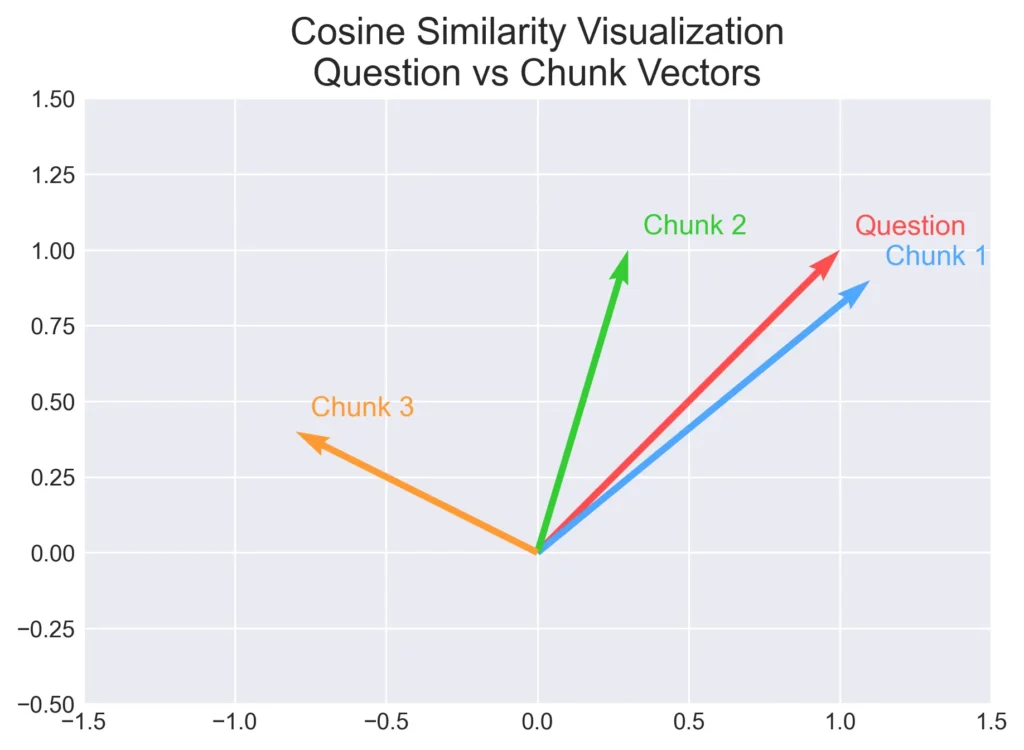
The “Question” vector is our reference point. Chunk 1 points in almost the same direction, so it has the highest similarity. Chunk 2 is somewhat aligned, while Chunk 3 points away, meaning it’s not relevant. In RAG with Ollama, this same idea happens in hundreds of dimensions where the model compares your question with every chunk and selects only the most relevant pieces before generating the final answer.
Applying Cosine Similarity to All Chunks
Now that we understand cosine similarity, we can apply it to the real embeddings we generated earlier. The idea is simple: we compare the question embedding with every chunk embedding and calculate a similarity score between 0 and 1.
- Higher score → chunk is more relevant to the question
- Lower score → chunk is unrelated
We loop through all 119 chunk vectors, compute the similarity, sort them from highest to lowest, and print the top matches. This tells us exactly which chunks contain the information Mistral needs to answer our question.
Here’s the code:
import numpy as np

q = np.array(question_embedding)

similarities = []  # (index, score)

for i, vec in enumerate(chunk_embeddings):
    v = np.array(vec)
    score = np.dot(q, v) / (np.linalg.norm(q) * np.linalg.norm(v))
    similarities.append((i, score))

similarities.sort(key=lambda x: x[1], reverse=True)

for idx, score in similarities[:10]:
    print(f"\n=== Chunk {idx} | similarity = {score:.4f} ===")
    print(char_chunks[idx][:300], "...")
When you run this code, you’ll see the top chunks ranked by similarity score. The highest-scoring chunks usually contain sentences describing the 2022 World Cup, the final match, and the winning team. These are exactly the pieces of text the RAG pipeline will pass to Mistral in the next step. Instead of reading all 14,665 tokens, the model now focuses only on the small sections that actually contain the answer.
Step 7: Build the RAG Context
Now we have everything we need on the retrieval side:
- a vector for the question
- 119 vectors for the chunks
- cosine similarity scores between the question and every chunk
The next step is to build the context we will send to Mistral. In simple terms, the context is just a string that contains the most relevant chunks glued together. We are telling the model:
“Here are the top N pieces of text related to the question. Use only these to answer.”
At first, I tried a small value like top_k = 5. The problem was that the chunk that actually contained the sentence:
“… Argentina were crowned the champions after winning the final against …”
was Chunk 2, and in my run it appeared at rank 6, not in the top 5. That means it was never included in the context, so Mistral still could not answer correctly.
Even after increasing to top_k = 10, the answer was still weak, probably because Mistral was still giving more weight to the highest-ranked chunks. When I increased top_k to 15, the correct chunk moved into the most relevant group, and the model finally had everything it needed.
This is normal in a RAG with Ollama workflow. Chunking and embedding work at the level of 200–300 tokens per chunk, not at the level of “one perfect answer sentence,” so you sometimes need to include a slightly larger set of chunks.
Here is the code I used to build the context with top_k = 15:
top_k = 15
top_indices = [idx for idx, score in similarities[:top_k]]

print(top_indices)

context = ""

for idx in top_indices:
    context += f"[Chunk {idx}]\n{char_chunks[idx]}\n\n"

print(context[:1000])  # just to preview
The print statements help you inspect which chunks were selected. In my case, I could clearly see that Chunk 2, with similarity around 0.7098, contained the line about Argentina being crowned the champions.
Now we are ready for the final part of the pipeline:
use this context, send it to Mistral, and ask the same question again to see how the answer changes.
Step 8: Ask Ollama Again Using RAG
Now we finally reach the point where everything comes together. At this stage, the retrieval part is already done: all 119 chunks were embedded, the question was embedded, cosine similarity scores were calculated, and the top 15 relevant chunks were selected and merged into a clean context string. From here on, we don’t deal with embeddings or vectors anymore. The model won’t see numbers, it will only see plain text. What we’re doing now is simply telling Mistral: “Here’s the important part of the document. Use this to answer my question.”
This is where the “generation” part of RAG kicks in. The chat model reads the context, reads the question, and produces an answer using only the text we provided. No retraining, no internet, no guessing, just grounded reasoning from the chunks we selected earlier.
Here’s the code we use to ask the question again using the context:
import requests

url = "http://localhost:11434/api/chat"

question = "Who won the FIFA World Cup 2022?"
#question = "Who was the champion in FIFA World Cup 2022?"
#question = "Who was crowned the champion in FIFA World Cup 2022?"

rag_prompt = f"""Use ONLY the information in the CONTEXT below to answer the QUESTION.
If the answer is not in the context, say you don't know.

CONTEXT:
{context}

QUESTION: {question}
"""

payload = {
    "model": "mistral",
    "messages": [
        {"role": "user", "content": rag_prompt}
    ],
    "stream": False
}

resp = requests.post(url, json=payload).json()
print(resp["message"]["content"])
When you run this, you should finally see a correct answer, something like: “Argentina won the 2022 FIFA World Cup.” The same Mistral model that originally had no knowledge of the event is now able to answer because we provided the exact pieces of text it needed. This is the core value of RAG with Ollama, you make a model smarter without retraining it, simply by giving it the right information at the right time.
Step 9: Compare the Results Before and After RAG
When you try the RAG with Ollama pipeline end-to-end, you’ll notice something interesting: the quality of the results depends not only on the chunk similarity, but also on how you phrase the question. If you look back at the code, you’ll see that I kept two additional question variations as comments:
#question = "Who was the champion in FIFA World Cup 2022?"
#question = "Who was crowned the champion in FIFA World Cup 2022?"
I kept these because I was experimenting with different phrasings. Every time I changed the question, the embeddings also changed, which means the cosine similarity scores changed as well. The more the question wording matches the language used in the original text, the fewer chunks you need to include in the context.
For example, the Wikipedia text literally says something like:
“… Argentina were crowned the champions after winning the final …”
So when the question was:
“Who was crowned the champion in FIFA World Cup 2022?”
the embedding became very close to the wording inside the chunk. That version worked correctly with only top 5 chunks, because the similarity score pushed the right chunk near the top. But when I used a more general phrasing like “Who won the FIFA World Cup 2022?”, the alignment with the text was weaker, so chunk 2 dropped to rank 6. That’s why I had to increase the context size to top 15 before Mistral could answer correctly.
This tells us something important:
RAG performance improves when the user’s question uses similar language to the source text.
Key Notes About Local RAG Performance
1. Small models need slightly more context
Mistral 7B is good, but not perfect. Larger models (Llama 3.1 8B, 70B, or Mixtral) tend to require fewer chunks because they are better at reasoning and extracting answers from partial context.
2. Chunking and embedding are not “answer-aware”
These steps only capture semantic similarity, not “where the actual answer is.” That’s why a more precise question sometimes moves the correct chunk higher.
3. The goal is to find the sweet spot for top_k
Too few chunks → risk missing the answer
Too many chunks → the context becomes noisy and harder for the model to focus
4. RAG quality is mostly about retrieval, not generation
If retrieval finds the right chunk, even small models answer correctly.
If retrieval fails, even a large model will hallucinate or say “I don’t know.”
Overall, the results clearly show the power of RAG. The same Mistral model that originally had no knowledge of the 2022 World Cup was able to answer correctly once we provided the right context. The key takeaway is that retrieval quality matters: better chunking, better embeddings, and better question phrasing all lead to better answers. This small experiment demonstrates exactly how RAG with Ollama can turn a local model into a smart, up-to-date assistant without the need for fine-tuning or cloud services.
Conclusion: When Should You Use RAG with Ollama?
This simple walkthrough shows how RAG with Ollama can transform a small local model like Mistral into a powerful, up-to-date assistant without any fine-tuning or cloud services. By embedding your documents, comparing similarity, and passing only the most relevant chunks as context, you give the model everything it needs to answer questions it was never trained on.
Feel free to experiment by trying different models, rephrasing your questions, adjusting top_k, or using your own documents and PDFs. Every change helps you understand how retrieval affects the final answer, and it’s the best way to build intuition for RAG systems.
For any inquiries, contact me here.
Explore more tutorials and guides in the Blog section.
For definitions of key terms, refer to our glossary post here.
Frequently Asked Questions
Is RAG with Ollama free to run locally?
RAG with Ollama is completely free to run locally. You only pay for your own hardware (CPU/GPU). There are no subscription fees, API credits, or cloud costs unless you choose to host models externally.
Can RAG with Ollama be used for customer support automation?
Yes. You can load internal manuals, policies, and troubleshooting guides, embed them, and let a local model answer questions based on your company’s documents. It works well for support teams that need full privacy.
What is RAG with Ollama used for?
RAG with Ollama lets you answer questions using your own PDFs, reports, and documents. It adds private, up-to-date knowledge to a local LLM without fine-tuning or cloud services.
Can I reuse the same chunk embeddings for different questions?
Yes. You generate embeddings for your documents once. Every new question only needs its own embedding, and then it’s compared against the existing chunk embeddings.
What is better, RAG or fine-tuning?
RAG is better when you need fresh, private, or changing information. Fine-tuning is useful when you need a specific style or behavior baked into the model. For knowledge-based tasks, RAG is usually the simpler and faster option.
Do I need to clean my data before running RAG with Ollama?
Usually yes. Clean text improves chunking, embeddings, and retrieval accuracy. In this post we didn’t need cleaning because the Wikipedia library gives clean text, but for PDFs or scraped data you should remove headers, footers, repeated text, and OCR noise.